
@AlStack - free-tier farms, live proxy pools, API research
Telegram: @AlStack
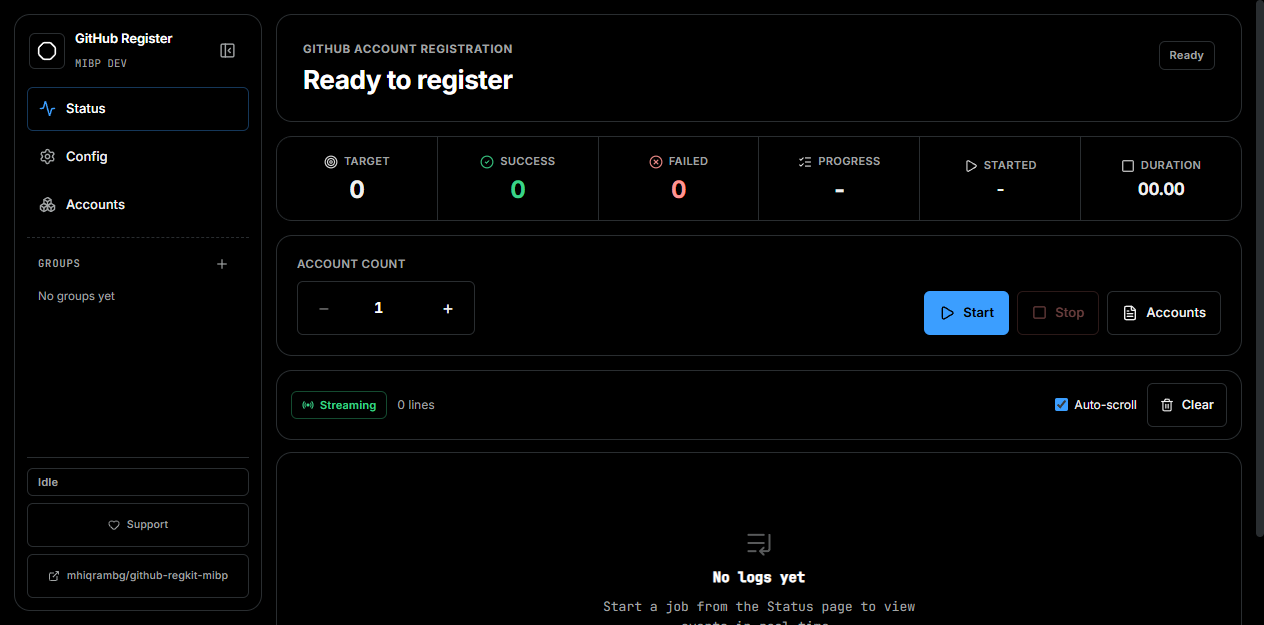
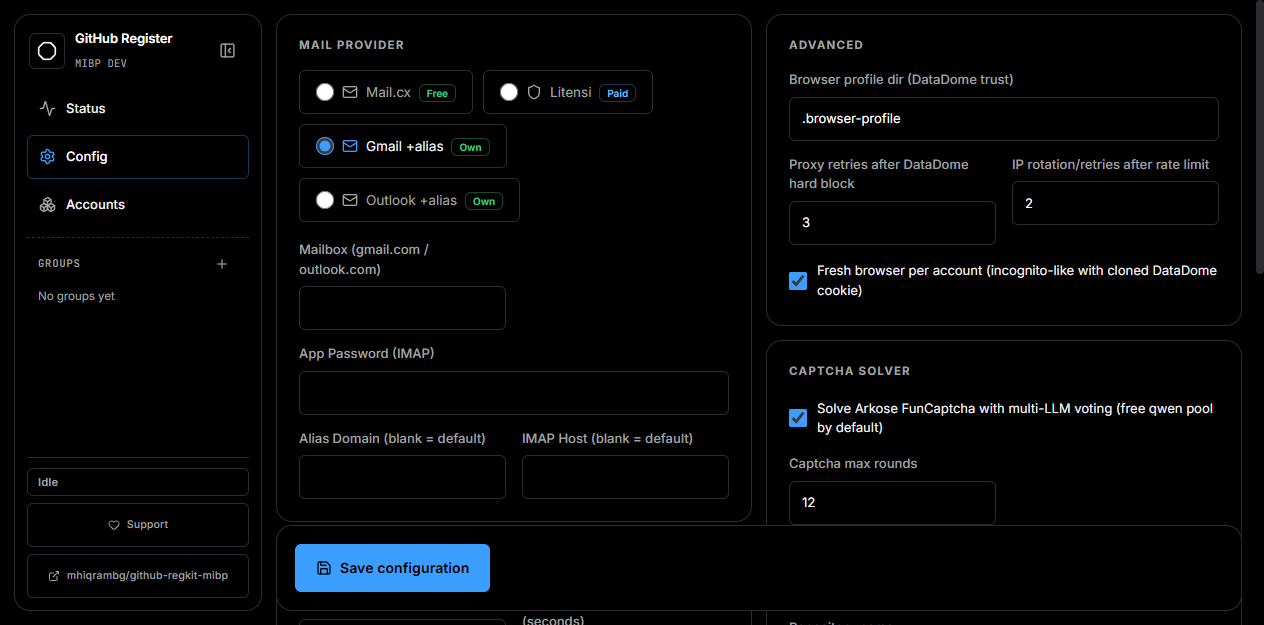
> **Published from the [t.me/AlStack](https://t.me/AlStack) channel** (`@AlStack`) - free-tier farms, > live proxy pools and API research. Every tool here gets built, measured and torn apart in the channel > before it becomes a repo; the limits in the docs are the ones that were actually hit. > What the channel publishes: [CHANNEL.md](CHANNEL.md). # GH-RegKit Prime Full-stack GitHub account autoreg farm: **Camoufox anti-detect browser + free mail.cx mailboxes + FREE multi-LLM Arkose FunCaptcha solver + proxy pool rotator + web dashboard**. Runs at $0 per account. > Telegram-канал: [@alstack](https://t.me/alstack) — апдейты, новые тулзы, разборы. ## Features | Feature | **Prime** | |---|---| | Signup flow | single-page form | **multi-step wizard** (email → Continue → password → Continue → username → Create account) | | Arkose FunCaptcha | none | **multi-model LLM voting solver** — sequence / rotate / character / wires | | Captcha cost | — | **$0** — qwen3-vl-flash + qwen-vl-max + qwen-vl-plus vote in parallel (~1-3 s each) via any OpenAI-compatible vision gateway | | Dashboard | config/jobs/logs/accounts/TOTP | same + captcha toggles (`solve_captcha`, `captcha_max_rounds`) + `create_pat` | | Warm-up | none | **homepage dwell + JS-scroll warm-up** — fixes `suspended` accounts | | PAT farming | none | **stage 6: classic PAT** (repo+workflow scopes) appended to the account row | | Knowledge base | — | [`docs/AUTOREG-KNOWLEDGE.md`](docs/AUTOREG-KNOWLEDGE.md) — every field-verified fact about GitHub autoreg | ### How the free captcha solver works 1. After **Create account**, Arkose FunCaptcha appears in an `octocaptcha.com` iframe (~16 s PoW, then "Visual puzzle"). 2. Solver clicks Visual puzzle, detects the variant, screenshots reference + all candidates, stitches a numbered grid, enhances with PIL. 3. Grid + variant prompt go to 3+ vision models **in parallel** (55 s deadline); each answers `ANSWER=`; majority wins. 4. Navigates to the winning candidate → Submit → repeats rounds until octocaptcha disappears (= passed). Annotated `REVIEW_rN.png` per round. ### Vision gateway (free default) ```bash set VOTE_BASE=http://127.0.0.1:16432/v1 # any OpenAI-compatible vision gateway set VOTE_KEY=*** set VOTE_MODELS=qwen3-vl-flash,qwen-vl-max,qwen-vl-plus ``` Works with OpenRouter, Aurora, one-api/new-api, LiteLLM — anything accepting `image_url` content parts. ### Pitfalls (field-learned) - Headful by default — headless is a DataDome/Picasso tell. - One sticky exit IP per account; mid-session IP rotation flags DataDome. - `character` variant on round 0 → `SKIP_VARIANT`, window reloads for a new challenge (models can't reach consensus on it). - Accounts created WITHOUT passing octocaptcha are born-locked. Never force-submit a disabled Create account button. - GitHub secondary rate limits last hours — stop, don't hammer. - Windows: run with `PYTHONPATH=""` if another env pollutes imports. --- # GitHub Register A GitHub account registration toolkit that uses Camoufox for browser automation and mail.cx (free, default), [Litensi](https://litensi.id) (paid), [temp.tf](https://temp.tf) (free gmail/outlook/hotmail alias pool, no keys), or your own Gmail / Outlook mailbox (IMAP +alias, unlimited addresses) for verification mailboxes. It can be run from the CLI, through a local web console, or as a Docker service behind an nginx reverse proxy. > Use this only for accounts and workflows you are authorized to manage. > Automated account registration may violate GitHub's Terms of Service and can > result in account or IP restrictions. ## Features - Creates a mailbox, password, and username for GitHub signup. Mail providers: mail.cx (free), temp.tf (free, shared gmail/outlook/hotmail alias pool, no keys needed), Litensi (paid), Gmail or Outlook via IMAP — one real mailbox, unlimited `base+random@domain` aliases, App Password auth. - Verifies the eight-digit GitHub launch code from the mailbox. - Logs in again when a newly verified account is redirected to `/login`. - Optionally creates a first repository, enables TOTP 2FA, and stores recovery codes per account. - Optionally sets a profile status and completes profile fields after 2FA. - Provides a web console for configuration, job control, live logs, account export, TOTP generation, and recovery-code viewing. - Works on desktop and mobile: the console reflows to a bottom navigation bar and a drawer on phones. - Organizes accounts into groups, merges account files into one, and exports accounts as TXT, CSV, or JSON. - Reorders a Litensi mailbox from the console to fetch a fresh code, capped at two minutes with a manual stop. - Protects the console with username + password auth (rate-limited, server-side sessions) for self-hosting. Web console — Status page with live streaming log Web console — mail provider config with Gmail +alias ## Requirements - Python 3.11 or newer. - Node.js 18 or newer, only to rebuild the frontend. - A mailbox provider: mail.cx works out of the box (free, default). For the Litensi provider, a Litensi account with API credentials and a balance. For Gmail/Outlook providers: an account with IMAP enabled and an App Password (Google: 2FA on → App Passwords; Outlook: alias/plus-addressing enabled). - Internet access. A residential proxy may be needed depending on your network. ## Installation ```bash git clone github-regkit cd github-regkit python3 -m venv .venv source .venv/bin/activate python -m pip install --upgrade pip pip install -r requirements.txt # Download Camoufox once. python -m camoufox fetch # Create local configuration. cp config.example.json config.json ``` On Windows PowerShell: ```powershell .venv\Scripts\Activate.ps1 ``` ### Linux (Ubuntu/Debian) Headful mode (`headless: false`) needs a display plus the Firefox system libraries. On a desktop these are usually already installed; on a minimal server install them and run inside a virtual display: ```bash # Ubuntu 22.04 sudo apt update sudo apt install -y libgtk-3-0 libdbus-glib-1-2 libxt6 libasound2 xvfb # Ubuntu 24.04 uses libasound2t64 instead of libasound2 sudo apt install -y libgtk-3-0 libdbus-glib-1-2 libxt6 libasound2t64 xvfb # headless VPS — wrap headful runs with a virtual display xvfb-run -a python main.py --count 1 ``` For unattended servers, `headless: true` (or `python main.py --headless`) works without a display, though it is slightly more likely to be flagged by DataDome. ## Configuration Set your local values in `config.json`. This file must never be committed. ```json { "mail_provider": "mailcx", "mailcx_domain": "", "litensi_api_id": "1234", "litensi_api_key": "your-api-key", "litensi_site": "github.com", "litensi_zone": "", "imap_user": "yourbox@gmail.com", "imap_password": "your-app-password", "imap_host": "", "imap_port": 993, "imap_alias_domain": "", "temptf_providers": "gmail.com,outlook.com,hotmail.com,high.edu.pl", "temptf_dot": true, "temptf_plus": true, "register_count": 1, "proxy": "", "proxy_file": "", "headless": false, "delay_sec": 5.0, "max_username_tries": 6, "otp_timeout_sec": 240, "browser_profile_dir": ".browser-profile", "fresh_profile": true, "proxy_hard_block_retries": 2, "proxy_rate_limit_retries": 2, "create_repo": true, "repo_name": "hello", "enable_2fa": true, "set_profile_status": true, "profile_status": "On vacation", "complete_profile": true, "profile_name": "", "profile_bio": "", "profile_location": "" } ``` | Field | Description | | --- | --- | | `mail_provider` | Mail backend: `mailcx` (free, default) or `litensi` (paid, more reliable). | | `mailcx_domain` | Mail.cx domain. Leave blank to auto-pick from available domains. | | `litensi_api_id` / `litensi_api_key` | Litensi API credentials (used when `mail_provider` is `litensi`). | | `litensi_site` | Sender domain in Litensi, for example `github.com`. | | `litensi_zone` | Mailbox zone. Leave blank to choose the cheapest in-stock zone. | | `register_count` | Accounts to process in one job. | | `proxy` | Optional single proxy in `http://user:pass@host:port` format. | | `proxy_file` | Optional proxy pool file in the project root (one `scheme://user:pass@host:port` per line). Each account picks a random proxy; also settable via the web console upload. Takes precedence over `proxy`. | | `headless` | Runs without a browser window. `false` is easier to observe and often more stable. | | `delay_sec` | Delay between accounts. | | `max_username_tries` | Username conflict retry limit. | | `otp_timeout_sec` | Maximum wait time for the verification email. | | `browser_profile_dir` | Persistent browser profile directory (trust cookies are carried separately, so fresh profiles still pass DataDome). | | `fresh_profile` | Uses a fresh browser profile for each account while carrying trusted cookies separately. | | `create_repo` / `repo_name` | Enables and names the first repository. | | `enable_2fa` | Enables TOTP 2FA and captures recovery codes. | | `set_profile_status` / `profile_status` | Enables and sets a post-2FA profile status. | | `complete_profile` | Enables post-2FA profile completion. | | `profile_name`, `profile_bio`, `profile_location` | Custom profile values. Blank fields use Random User or ZenQuotes data. | ## Running ### Web console Build the UI after frontend changes: ```bash cd frontend npm install npm run build cd .. ``` Start the local server: ```bash source .venv/bin/activate python -m web.server ``` Open . - **Status**: start or stop jobs and inspect progress. - **Live Log**: review events in real time. - **Config**: edit local settings, check Litensi zones (with a zone search), and check mail.cx domains. - **Accounts**: copy or export accounts (TXT / CSV / JSON), generate TOTP codes, view recovery codes, resend a Litensi mailbox code, merge one account file into another, and organize accounts into groups. Each row has an actions menu for group, copy, 2FA, recovery, resend, and delete. The console is responsive: the sidebar collapses to an icon rail on narrow laptops, and on phones it switches to a top bar, a bottom navigation bar, and a slide-in drawer, with account rows reflowed into cards. ### Resend mailbox code **Accounts → row actions → Resend mailbox code** reorders the same Litensi mailbox and polls its status until a new GitHub code arrives or two minutes pass. It stops automatically at the cap, and the dialog has a Stop button for an early abort. Reorder needs only the API credentials from `config.json` and the email stored in the accounts file, so no extra metadata is kept. The provider validates ownership of the email, so an address that was not ordered on this Litensi account fails with `ACTIVATION DOES NOT EXIST`. Protect the web console with username + password (like n8n/WAHA) for self-hosting/production. Copy `.env.example` to `.env` and fill it in (`.env` is git-ignored; server auto-loads it, no extra dependency): ```bash cp .env.example .env python -m web.server ``` ```dotenv GITHUB_REGISTER_HOST=127.0.0.1 GITHUB_REGISTER_PORT=8093 GITHUB_REGISTER_USERNAME=admin GITHUB_REGISTER_PASSWORD=use-a-strong-password ``` Legacy single-password mode still works (`GITHUB_REGISTER_ACCESS_PASSWORD`), but username+password is preferred. When auth is enabled, the API docs page is disabled and every API route requires login. Login attempts are rate-limited per IP (10 failures/60s → HTTP 429), oversized login bodies are rejected (413), credential comparison is timing-safe, security headers are set (`nosniff`, `DENY` framing, `no-referrer`, `no-store` on APIs), and Sign out invalidates the server-side session. The server binds to `127.0.0.1` by default — only bind `0.0.0.0` behind a trusted reverse proxy with HTTPS. To open the console from another device on the same network (phone, tablet), set `GITHUB_REGISTER_HOST=0.0.0.0` in `.env`, restart the server, then browse to `http://:8093` from the other device. Always set a strong `GITHUB_REGISTER_USERNAME`/`GITHUB_REGISTER_PASSWORD` first: `config.json` holds real API keys and proxy credentials, so an unauthenticated `0.0.0.0` bind exposes them to everyone on that network. Use this only on a trusted private network, never on public Wi-Fi. ### Docker Multi-stage image: `node:20-alpine` (frontend build) + `python:3.12-slim` (runtime, includes Camoufox Firefox + `xvfb` for headful mode): ```bash cp .env.example .env # set a strong GITHUB_REGISTER_PASSWORD cp config.example.json config.json touch proxies.txt .datadome-trust.json github_recovery_codes.txt docker compose up -d --build ``` Open for a quick local check. (The compose file in this repo does not publish ports — production traffic goes through nginx, see below; add a `ports:` entry if you need direct local access.) Compose overrides `GITHUB_REGISTER_HOST=0.0.0.0` inside the container. All files below persist on the host via bind-mount (do not delete): `config.json`, `accounts/` (`github_accounts_*.txt`, `recovery/`, `groups.json`), `.browser-profile/`, `proxies.txt`, `.datadome-trust.json` (trust cookie — losing it means DataDome 403s from scratch), `github_recovery_codes.txt`. Not persistent, which is fine: web login sessions (in memory — log in again). For display-less VPS, set `"headless": true` in `config.json` (cheaper, slightly easier for DataDome to flag). A DataDome challenge cannot be solved without a visible window, so headless runs fail fast instead of waiting for a manual click; use a residential proxy for headless. ### VPS + nginx reverse proxy (one docker network) Compose already joins the external `nginx-network` and does **not** publish ports — public access only via nginx. Make sure the network exists: ```bash docker network ls | grep nginx-network || docker network create nginx-network docker compose up -d --build ``` Example server block in nginx (same network, TLS via certbot): ```nginx server { listen 443 ssl; server_name regkit.example.com; location / { proxy_pass http://app:8093; proxy_http_version 1.1; proxy_set_header Host $host; proxy_set_header X-Real-IP $remote_addr; proxy_set_header X-Forwarded-For $proxy_add_x_forwarded_for; proxy_set_header X-Forwarded-Proto $scheme; # SSE live-log: no buffering + no quick timeouts proxy_buffering off; proxy_read_timeout 86400s; } } ``` `GITHUB_REGISTER_TRUST_PROXY=1` (already in compose) makes rate-limit read the real IP from `X-Forwarded-For`. Do not enable it when the container is exposed directly without a proxy. ### CLI ```bash source .venv/bin/activate python main.py python main.py --count 3 python main.py --proxy http://user:pass@host:port python main.py --headless python main.py --config config.local.json --count 1 ``` Press `Ctrl+C` to stop the CLI or server. A `KeyboardInterrupt` or `asyncio.CancelledError` during Uvicorn shutdown is expected after interruption. ## Registration Flow 1. Open the signup page and fight through DataDome until the form is ready. 2. Only then order a mailbox with the configured provider (mail.cx is implicit and free; Litensi orders a zone, auto-picking the cheapest in-stock zone when `litensi_zone` is blank). Ordering late avoids burning balance/expiry while DataDome eats time; a fatal provider failure (empty balance, bad key, out of stock, IP not allowed) aborts the job immediately. A single mailbox that never receives the GitHub code within `otp_timeout_sec` is only a per-account failure — that account is counted as FAIL and the batch continues with the next one. 3. Open GitHub signup and fill email, password, and a username based on the mailbox local part. 4. Submit the form. If an overlay intercepts pointer clicks, the runner falls back to a DOM click. A disabled form is refreshed and filled with the same data before switching browser sessions. 5. Poll the mailbox and enter the GitHub launch code. 6. Sign in again if GitHub redirects the new account to login. 7. Create the first repository when enabled. 8. Enable TOTP 2FA, capture recovery codes, and persist them per account. 9. Optionally set profile status, then complete profile name, bio, and location. Post-signup stage failures do not discard an account that was already verified. The reason is written to Live Log. ## Account Output ```text accounts/ github_accounts_.txt recovery/ .txt ``` Each account file contains one line per account: ```text email----password----username----totp_secret----has_recovery ``` Recovery codes are stored separately under `accounts/recovery/`. The Accounts page can reveal and copy them with the **Recovery** action. Example account output: ```text user@example.com----example-password----example-user----EXAMPLETOTPSECRET000 ``` Generate a TOTP code manually from the fourth field: ```bash python -c "import pyotp; print(pyotp.TOTP('EXAMPLETOTPSECRET000').now())" ``` ## Recording a Manual Flow `record_camoufox.py` opens Camoufox and records clicks, inputs, and navigation. ```bash .venv/bin/python record_camoufox.py .venv/bin/python record_camoufox.py --url https://github.com/login ``` Its output can contain email addresses, session URLs, and selectors. Treat `recorded_steps.json` as sensitive local data. ## Troubleshooting | Problem | Action | | --- | --- | | `BAD SITE` | Use a complete domain such as `github.com` for `litensi_site`. | | No zone or stock | Use **Check Zone**, choose an in-stock zone, or leave it blank for automatic selection. | | No verification email | Check Litensi balance and allow the mailbox reorder retry. | | Proxy `405/407` on CONNECT | Scheme/port/auth mismatch in `proxies.txt` (e.g. SOCKS endpoint declared as `http`). Verify with `curl -x https://api.ipify.org`. | | VPS runs old code | The image is stale — `git pull` then `docker compose up -d --build` on the VPS. | | `config.json`/`proxies.txt` became directories | They did not exist before `up`, so docker created folders. `rm -rf` them, create real files (`cp`/`touch`), then `up` again. | | VPS IP port 80/443 unreachable | Nothing listening or firewall closed: check `docker ps`, `curl http://127.0.0.1:80` on the host, `ufw status`, and the cloud security group. The app itself exposes no ports — traffic must flow through nginx. | | Console returns 403 errors after redeploy | Stale token: sessions live in server memory and die on restart, while the browser keeps the old token. Reload the page — the UI now detects this and returns to the login screen automatically. Just log in again. | | DataDome hard block or signup 403 | Change IP/proxy, disable VPN/WARP, then retry after a delay. | | Create account or repository will not click | Review Live Log. Native clicks fall back to DOM clicks when an overlay intercepts them. | | Web UI does not reflect frontend changes | Run `npm run build`, then restart `python -m web.server`. | ## Security - Never commit `.env`, `config.json`, `proxies.txt`, `accounts/`, `.browser-profile/`, `.datadome-trust.json`, `github_recovery_codes.txt`, recovery codes, or browser recordings. - Account files contain full credentials, including password and TOTP secret. - Recovery codes grant account recovery and should be stored securely. - Web console auth: username + password from `.env`, 10 failed logins/60s per IP → HTTP 429, sessions are server-side and die on Sign out. Only expose via HTTPS reverse proxy; never enable `TRUST_PROXY` without one. - Before pushing, inspect `git status --short` and `git diff --cached`. ## License Released under the [MIT License](LICENSE). ## Proof (2026-10-10) - **50 accounts** in the daily bank, **5 full gmail cycles** (2FA TOTP + 16 recovery codes + PAT `ghp_...` + filled profile) - Provider: Gmail +alias via IMAP (`baradok609+@gmail.com`) — one mailbox, unlimited addresses - Launch code read live from IMAP: `verification code: 58423445` → typed into 8 boxes → `logged_in cookie confirmed` - Dead-proxy fast-rotate: timeout/`` → proxy disabled after 2 navigations (was burning 5 min/account) - Repo stage: React native-setter + direct-visit probe (fixed `creation not confirmed`) - Profile stage: lazy react-partial render → scroll + 3-try retry (fixed `Edit profile button not found`) ---
Telegram: @AlStack **More free-tier farms, live proxy pools and API teardowns - [t.me/AlStack](https://t.me/AlStack)** Measured on live tiers, published with the failures included. If this repo saved you an evening, star it and tell the channel what you built with it.